(Source)
Your website’s performance can make or break your SEO strategy. In 2025, search engines will focus more on user experience, page speed optimization, and technical SEO. A slow, unoptimized website doesn’t just frustrate visitors, it sends a signal to search engines that your site isn’t providing the best experience.
Studies show that one-second delays in page load time can lead to a 7% drop in conversions. Imagine the revenue businesses lose due to common website performance mistakes and fixes that are often overlooked.
So, how do you ensure your website is in top shape? A comprehensive website audit can help identify website speed issues, SEO errors, and other technical bottlenecks that impact rankings. In this guide, we’ll explore the top 10 website performance issues hurting your SEO and how to fix them effectively.
By the end of this article, you’ll have actionable insights on improving website SEO performance and keeping your site running smoothly in 2025.
What is Website Performance & Why It Matters for SEO?
A high-performing website is more than just a fast-loading page, it’s about ensuring seamless user experience, optimized content delivery, and technical SEO excellence.
Why Does Website Performance Matter for SEO?
- Google’s Algorithm Prioritizes Speed & UX
Google’s Core Web Vitals focus on metrics like Largest Contentful Paint (LCP), First Input Delay (FID), and Cumulative Layout Shift (CLS), all tied directly to performance.
- User Experience (UX) Directly Impacts Rankings
Slow websites lead to high bounce rates. If users abandon your site before it loads, search engines assume your content isn’t valuable. Page speed optimization ensures that your visitors stay engaged and convert.
- Mobile Performance is Now Non-Negotiable
With mobile-first indexing, Google evaluates your mobile site before the desktop version. If your mobile site has SEO issues, slow load times, or technical SEO flaws, it directly affects your rankings.
- Technical SEO & Performance Go Hand-in-Hand
A site with excessive redirects, broken links, unoptimized code, and slow response times struggles to rank well. Fixing website speed and technical SEO issues can drastically improve search engine performance.
Key Performance Factors That Affect SEO
To achieve top search rankings, businesses must focus on:
- Website speed: A fast-loading website reduces bounce rates and improves user engagement.
- Optimized images & scripts: Heavy images and excessive scripts slow your website performance.
- Efficient hosting & caching: A slow server impacts page speed optimization, affecting SEO rankings.
- Mobile-friendly design: If your website isn’t responsive, you risk losing mobile traffic and search visibility.
The Solution? Regular Website Audits
A website audit is the best way to identify and resolve technical SEO problems. It helps uncover common website performance mistakes and fixes before they affect your rankings.
Next, we’ll break down the top 10 website performance issues that could hurt your SEO and provide step-by-step solutions to fix them.
Top 10 Website Performance Issues Hurting Your SEO & How to Fix Them
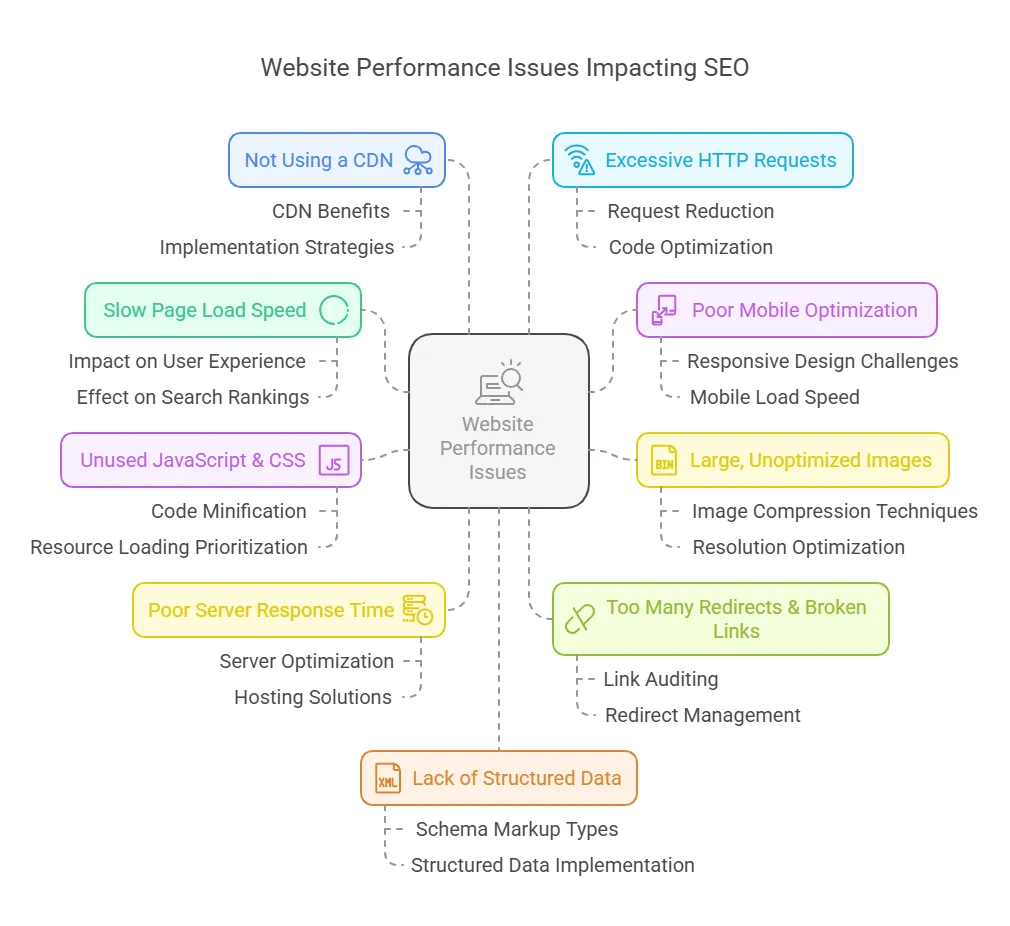
Even if your content is excellent, your SEO performance will suffer if your website has technical SEO issues, slow page speed, or poor user experience. Below are the top five website performance issues preventing your site from ranking higher, along with actionable fixes to get back on track.
1. Slow Page Load Speed
Why It’s Hurting Your SEO
A slow website is one of the most damaging SEO issues you can have. Research by Google shows that 53% of mobile users leave a site if it takes longer than 3 seconds to load. Google prioritizes fast-loading websites in rankings, and a slow page speed leads to:
- Higher bounce rates mean users leave before engaging.
- Lower crawling frequency, which affects how often search engines index your content.
- Poor Core Web Vitals scores, directly impacting search rankings.
How to Fix It
- Optimize Images: Compress large images using WebP or JPEG format, enabling lazy loading.
- Reduce Server Response Time by Switching to a faster hosting provider, using a CDN, and enabling browser caching.
- Minify CSS & JavaScript: Remove unused CSS and defer non-critical JavaScript files to speed up rendering.
2. Poor Mobile Optimization
Why It’s Hurting Your SEO
With Google’s mobile-first indexing, your mobile site must be as fast and user-friendly as your desktop version. Poor mobile optimization leads to:
- Lower rankings due to bad mobile experience.
- Frustrated users who leave the site quickly.
- A drop in mobile conversions, impacting revenue.
How to Fix It
- Use Responsive Design: Ensure your site adapts smoothly across devices.
- Optimize Touch Elements: Buttons and links should be easy to tap without zooming.
- Accelerate Load Times: Implement AMP (Accelerated Mobile Pages) for faster mobile browsing.
3. Large, Unoptimized Images
Why It’s Hurting Your SEO
Images are one of the biggest culprits of slow page speeds. If your website loads high-resolution images without optimization, it can:
- Increase load times, especially on mobile.
- Consume excessive bandwidth, affecting user experience.
- Hurt technical SEO, making it harder for search engines to crawl your site efficiently.
How to Fix It
- Compress Images: Use tools like TinyPNG or ImageOptim to reduce file sizes without losing quality.
- Use Next-Gen Formats: Switch to WebP instead of PNG or JPEG for faster load times.
- Implement Lazy Loading: Ensure images load only when users scroll down to that section.
4. Unused JavaScript & CSS Blocking Rendering
Why It’s Hurting Your SEO
When browsers load your website, they must process JavaScript and CSS files before displaying the page. Too many blocking resources can:
- Delay content rendering, making pages appear slower.
- Hurt SEO rankings due to a high First Contentful Paint (FCP) score.
- Impact mobile performance, where speed matters most.
How to Fix It
- Minify and Combine CSS & JavaScript: Reduce unnecessary lines of code.
- Defer Non-Essential Scripts: Load JavaScript only when needed using the async or defer attributes.
- Use a Content Delivery Network (CDN): A CDN helps distribute files faster globally.
5. Poor Server Response Time & Hosting Issues
Why It’s Hurting Your SEO
Your website speed depends mainly on your hosting provider and server performance. If your server response time is slow, it results in:
- Delayed page loads, frustrating users, and increasing bounce rates.
- Google crawls fewer pages per visit, reducing indexing efficiency.
- Poor performance during traffic spikes, leading to downtime.
How to Fix It
- Upgrade Hosting: Choose a VPS, dedicated server, or cloud-based hosting for better performance.
- Enable Caching: Use server-side caching to store frequently accessed data.
- Optimize Database Queries: Clean up old or unnecessary database entries to improve speed
6. Too Many Redirects & Broken Links
Why It’s Hurting Your SEO
Every time a page redirects to another URL, it adds extra load time. While some redirects are necessary, too many 301 and 302 redirects can:
- Slow down website performance, increasing page load time.
- Confuse search engine crawlers, affecting indexing efficiency.
- Frustrate users, leading to higher bounce rates.
- Broken links hurt credibility and user trust, making your website look outdated.
How to Fix It
- Audit and Minimize Redirect Chains: Use tools like Screaming Frog or Ahrefs to detect excessive redirects.
- Fix Broken Links: Regularly check for broken links using Google Search Console or Broken Link Checker.
- Use 301 Redirects Wisely: Redirect old or outdated URLs only when necessary.
7. Not Using a Content Delivery Network (CDN)
Why It’s Hurting Your SEO
A Content Delivery Network (CDN) ensures website content loads quickly, regardless of user location. Without it, users far from your hosting server experience:
- Slow page load times, especially for global audiences.
- Increased latency affecting page speed optimization.
- Poor user experience, leading to higher bounce rates.
How to Fix It
- Implement a CDN: Use Cloudflare, Akamai, or Amazon CloudFront to speed up content delivery.
- Enable Edge Caching: Store static content at multiple data centers to reduce server requests.
- Optimize Global Load Balancing: Distribute traffic efficiently across servers to prevent overloads.
8. Excessive HTTP Requests & Bloated Code
Why It’s Hurting Your SEO
Whenever a browser loads your webpage, it requests multiple files, including CSS, JavaScript, and images. If your website has excessive third-party scripts, tracking codes, or unnecessary plugins, it results in:
- Longer load times due to redundant HTTP requests.
- Increased server strain, slowing down performance.
- Poor SEO rankings as search engines prioritize leaner, faster sites.
How to Fix It
- Reduce HTTP Requests: Minimize external scripts and consolidate CSS/JS files.
- Remove Unused Plugins: Only keep essential plugins to avoid bloated code.
- Leverage Browser Caching: Store static resources locally to reduce reload times.
9. Lack of Structured Data & Schema Markup
Why It’s Hurting Your SEO
Search engines rely on structured data to understand and display content effectively. Without proper schema markup, your site may:
- Miss out on featured snippets, rich results, and better CTRs.
- Have less informative search listings, reducing organic clicks.
- Struggle with understanding search engines and have lower visibility.
How to Fix It
- Implement JSON-LD Schema Markup: Use Google’s Structured Data Testing Tool to add structured data.
- Add Schema for Key Pages: Apply relevant schema types such as FAQ, How-To, or Product Markup.
- Use SEO Plugins: Yoast SEO or Rank Math can help automate structured data implementation.
10. Inadequate Caching Strategies
Why It’s Hurting Your SEO
Caching plays a crucial role in reducing load times and improving website speed. Without proper caching strategies, your website:
- Loads are slower, especially for returning visitors.
- Consumes higher server resources, reducing efficiency.
- It affects page speed optimization, leading to lower rankings.
How to Fix It
- Enable Browser Caching: Store frequently accessed files locally.
- Use Server-Side Caching: Implement object caching to speed up database queries.
- Optimize CDN Caching Rules: Set cache expiration headers to reduce redundant requests.
A slow, unoptimized website doesn’t just lose traffic, it loses potential customers and revenue.
Addressing these standard website performance mistakes and fixes can help businesses ensure better rankings, improved user experience, and higher conversions.
LexiConn: Your Partner in Website Optimization & SEO Performance
At LexiConn, we know that website performance is the backbone of SEO success. Even the most well-crafted content won’t rank if your site speed is slow, technical SEO is weak, or mobile experience is subpar.
That’s why we offer comprehensive website audits designed to identify and resolve critical performance issues, before they cost you traffic and revenue.
Our Website Audit Services Cover:
✅ SEO Performance Audit – We analyze technical SEO, keyword optimization, and backlink health to improve search rankings.
✅ User Experience (UX) Audit – We evaluate navigation, mobile responsiveness, and accessibility to enhance engagement.
✅ Page Speed & Performance Optimization – Our experts detect load time delays and server inefficiencies to boost site speed.
✅ Security & Compliance Review – We uncover security vulnerabilities, HTTPS issues, and data privacy risks.
✅ Content Effectiveness Assessment – Our team reviews content structure, keyword targeting, and relevance for better search visibility.
Turn Website Performance into Your Competitive Advantage
Every second of delay in page speed can mean lost visitors, lower engagement, and reduced conversions. The good news is that these challenges are entirely fixable with the right website audit and performance strategy.
It’s time to transform your website from a liability into a high-performing asset. LexiConn’s expert website audits uncover critical performance gaps and provide customized, data-driven solutions to improve SEO, user experience, and overall efficiency.
Don’t let an underperforming website cost you business. Take the first step toward a faster, wiser, and more search-friendly website today.
Schedule your FREE 30-minute website audit consultation with LexiConn. Visit www.lexiconn.in or email book a free consultation to get started.
Boost your Content Strategy.
Download the Free eBook now.
Unlock Generative AI's potential for content marketing success. Unearth its impact on teams and businesses. Witness real-life examples and case studies, showcasing AI-driven content ingenuity.